
The GIAnalyzer ribbon
Last updated 10 November 2026
When GIAnalyzer is installed, Excel has a GIAnalyzer tab. Its buttons are in six groups.

| Group | Buttons | What they do |
|---|---|---|
| Financial Instruments | Bonds, FX Derivatives, Interest Rate Derivatives, Inflation Derivatives, Equity Derivatives | Functions and workbooks for each class of instrument |
| Additional Functions | Risk and Performance, Interest Rates, Other | Functions not tied to one instrument: risk and performance measures, VaR, interest rate calculations, interpolation and other helpers |
| Calculation Tools | Calculate Selection, Calculate Function, Saving Options | Save time in workbooks with heavy calculations. See Calculation tools. |
| Support | Documentation, Licensing, Contact us | PDF documentation, your licence, an email to us |
| Updates | Check for updates, or Install Update | New versions. See Updating GIAnalyzer. |
| Banks | Map and Load Confirmations, Map and Load Positions | Confirmation Mapper and Position Mapper, licensed separately. See Banks below. |
Financial Instruments and Additional Functions
Each button opens a menu in two parts.
Functions. Submenus by instrument, and within an instrument by output or by calculation method. Click a function name to insert it into the selected cell: see Using the functions.
Workbooks. Below the functions, the workbooks for that module, under up to three headings:
- Workbooks - Examples: how to use the functions, sheet by sheet.
- Workbooks - Templates: starting points for your own work, such as portfolio valuation or curve building.
- Workbooks - Manual Calculations: in the Interest Rate Derivatives and Inflation Derivatives menus only. They work the calculation out step by step and compare it with the function's result.
Click a workbook to open it. See Example and template workbooks.
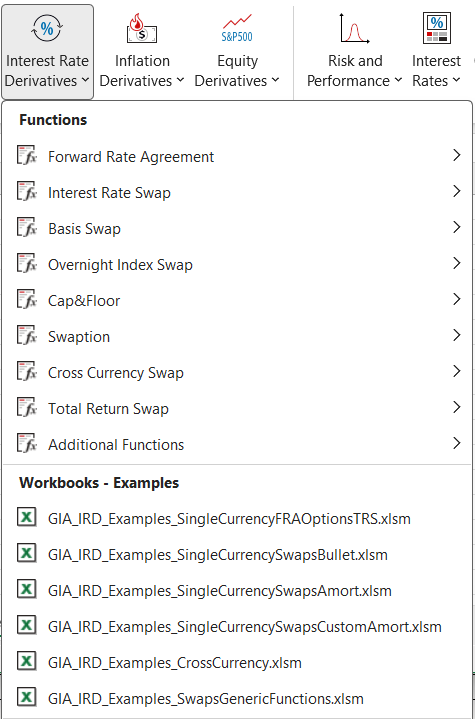
What the menus hold:
| Button | Function submenus |
|---|---|
| Bonds | Zero coupon, fixed coupon and floating coupon bonds (bullet and amortizing), convertible bond, cash-flow table, additional functions |
| FX Derivatives | Forwards, vanilla options, digital, touch, single barrier, double barrier and Asian options, additional functions |
| Interest Rate Derivatives | Forward rate agreements, interest rate swaps, basis swaps, overnight index swaps, caps and floors, swaptions, cross-currency swaps (all four leg combinations), total return swaps, additional functions |
| Inflation Derivatives | Zero coupon inflation swaps, real rate swaps |
| Equity Derivatives | European and American vanilla options, digital, touch, single barrier, double barrier and Asian options, executive stock options, additional functions |
| Risk and Performance | Average, frequency, percentile, volatility, beta, correlation, tracking error, ratios and measures, Value at Risk (historical, Monte Carlo, hybrid historical) |
| Interest Rates | Interest rates, discount factors, forward rates, inflation, time |
| Other | Interpolation, currency conversion, FX spot lookup, weekday, sum, average and count |
The full coverage, with the models behind each instrument, is on Coverage and models.
Support
- Documentation opens PDF documentation installed with GIAnalyzer. For the current documentation, use this guide and the function reference.
- Licensing opens the licence window. See Activating your licence.
- Contact us opens a new email to info@gammaimpact.co.il in your email program. The email already holds your Windows, Excel and .NET versions. Please leave them in: they help us answer.
Updates
The Updates group appears a few seconds after Excel starts, when GIAnalyzer was installed with the online version. It shows Check for updates, or Install Update when a new version is waiting.
Banks
- Map and Load Positions runs Position Mapper on a folder of your banks' position files. See the Position Mapper guide.
- Map and Load Confirmations runs Confirmation Mapper. It has three items: From Inbox, From folder and Settings. See the Confirmation Mapper guide.
Both are greyed out unless your licence includes them.