
Calculation tools
Last updated 9 November 2026
In a workbook with many time-consuming formulas, recalculating everything after each change can keep Excel busy for minutes. The usual answer is Excel's manual calculation mode: Excel then recalculates only when you ask. The three tools in the Calculation Tools group make manual mode easier to work with.
The tools work only in manual mode. Set it in Excel under Formulas > Calculation Options > Manual. In automatic mode the three buttons are greyed out. They also need a valid licence, for any module.
Calculate Selection
Recalculates only the cells you select.
- Select the cells to recalculate.
- Click Calculate Selection.
Excel's own Calculate Sheet (Shift+F9) recalculates the whole active sheet. Calculate Selection recalculates less, so it finishes sooner.
Calculate Function
Recalculates every cell that uses one function, in the active sheet or in the whole workbook.
- Click Calculate Function.
- Type the function's name, for example
GIA_IR_ForwardRatefromIRCurve. Upper or lower case doesn't matter. - Under Calculate within, choose This worksheet or This workbook.
- Click OK.
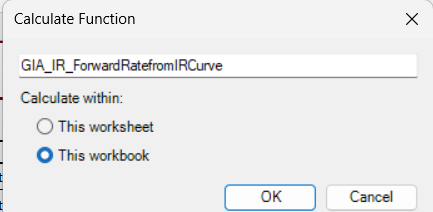
It recalculates the cells whose formula begins with that function, such as
=GIA_IR_ForwardRatefromIRCurve(…). A cell where the function sits inside a
longer formula, such as =2*GIA_IR_ForwardRatefromIRCurve(…), is not included.
If no cell qualifies, a message says so, and the window stays open for another
name.
The window remembers the last name and choice until you close Excel.
Saving Options
In manual mode, Excel's default is still to recalculate the whole workbook before saving it. In a heavy workbook, that can mean minutes of waiting at every save.
So when you switch Excel to manual calculation, GIAnalyzer turns off Excel's Recalculate workbook before saving option for you. The Saving Options menu shows which setting is on. You can also change it in Excel, under File > Options > Formulas.
When recalculation before saving is on, GIAnalyzer recalculates each sheet before the workbook is saved. If a sheet can't be calculated, a message titled "Calculate before save - ERROR" names it. The workbook is saved anyway.