
Activating your licence
Last updated 10 November 2026
GIAnalyzer runs with a licence key: a block of text we email to you. You get a trial key when you start a free trial, and a licence key once your licence is agreed.
The key is stored for your Windows user on that computer. Activation works offline: GIAnalyzer does not contact us to check the key.
Enter your key
- Open Excel and select the GIAnalyzer tab.
- Click Licensing. The GIAnalyzer License window opens.
- Copy the whole key from our email and paste it into the box.
- Click Apply. Your name, email, end date and licensed features appear in the window.
- Click OK.
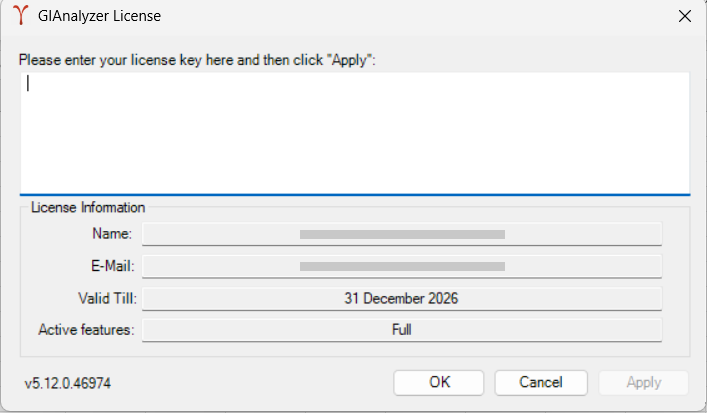
What the licence window shows
| Field | What it shows |
|---|---|
| Name, E-Mail | Who the licence was issued to |
| Valid Till | The last day of the licence, or Lifetime. "(Expired)" is added once the date has passed. |
| Active features | Full for a licence that covers every GIAnalyzer module; otherwise the modules your licence includes |
| Version (bottom corner) | The version of GIAnalyzer you are running |
If the key is not accepted
- "Your license is corrupt." The key could not be read. Check that you pasted the whole key, exactly as you received it. If the message comes back, email us.
- "The license you entered is expired." The key's end date has passed. Email us for a new key.
Trial
The trial key runs the full version for 30 days. Its end date shows under Valid Till in the licence window.
Modules
GIAnalyzer is licensed by module. The licence window lists yours under Active features.
| Module | What it covers |
|---|---|
| Bonds | The Bonds menu: its functions and workbooks |
| FXD | The FX Derivatives menu |
| IRD | The Interest Rate Derivatives menu |
| IND | The Inflation Derivatives menu |
| EQD | The Equity Derivatives menu |
| RPM | The Risk and Performance menu |
| IR | The Interest Rates menu |
| Full | All seven modules above, and the functions that belong to none of them: the Other functions and the Value at Risk functions (GIA_VaR_…) |
If your licence covers only some modules:
- the ribbon menus of the other modules open the Licensing window instead of a function or workbook;
- the functions of the other modules don't calculate (see Using the functions).
The calculation tools work with any valid licence.
When your licence ends
When the licence expires, GIAnalyzer's functions stop calculating, the ribbon menus open the Licensing window, and the calculation tools stop working. Nothing is charged automatically. To continue, email us for a new key and enter it as above.
Position Mapper and Confirmation Mapper
The two mappers are licensed separately: a Full licence doesn't include them. When your licence includes a mapper, its button in the Banks group is available. Otherwise the button is greyed out. See the Position Mapper guide and the Confirmation Mapper guide.