Excel Workbooks
Interest Rates
Examples
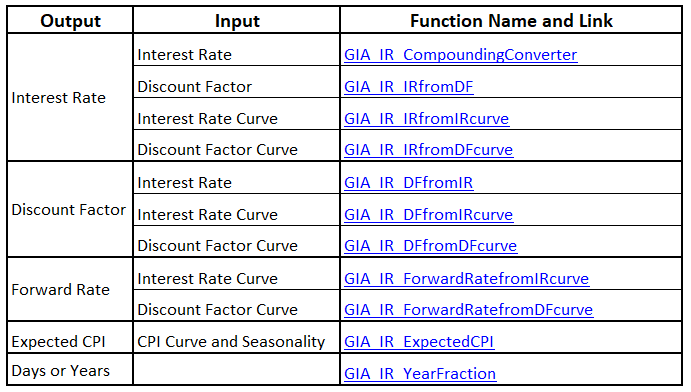
Files illustrating the use of functions come with the Navigator spreadsheet, which provides a list of outputs, inputs of market data, the names of the functions used in the file and their descriptions. Clicking on the function name will bring you to the relevant cells in the required spreadsheet. Following is an example from the GIA_IR_Examples file (the column showing the functions descriptions is not shown here).
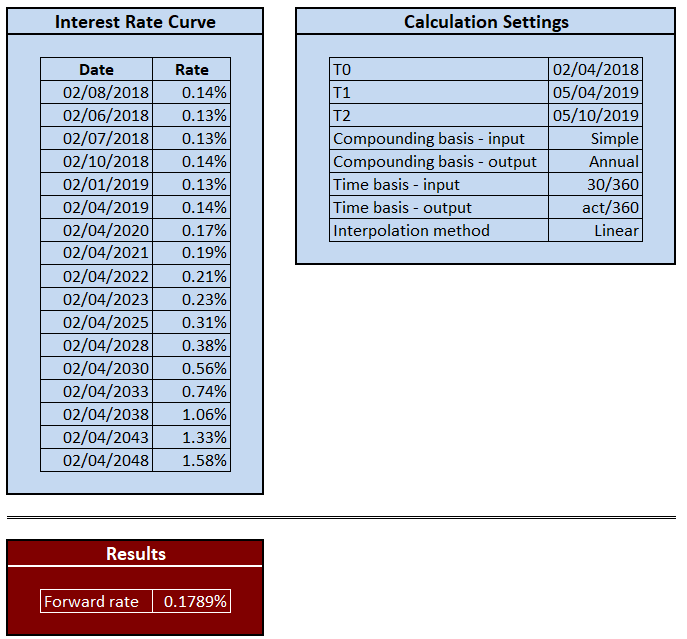
Most spreadsheets share the same structure. They consist of three sections:
- Data
- Calculation Settings
- Results
We will demonstrate this using the ForwardRateFromIRcurve spreadsheet from the file GIA_IR_Examples: