
GIAnalyzer FAQ
Questions about installing GIAnalyzer, the free trial, licensing and each library of functions. The instruments and models behind the functions are in the Coverage and models FAQ.
Installation
(7)
What does GIAnalyzer need?
Windows, and the desktop version of Microsoft Excel for Windows, 32-bit or 64-bit. It also needs .NET Framework 4.8 and some Microsoft runtime components, which the installer or the Repair Tool adds if they are missing. The details are in Installing GIAnalyzer.
Is there a version for Mac?
No. GIAnalyzer runs only on Windows. On a Mac, you can use it in Excel on a Windows virtual machine.
Should I install the online or the offline version?
The online version installs from our website and checks for a new version each time Excel starts. We recommend it when the computer can reach the internet. The offline version installs from files on your computer: use it when the computer has no internet connection, or your organisation's rules don't allow online installation. It doesn't update itself; see Updating GIAnalyzer.
Can I install GIAnalyzer on more than one computer?
GIAnalyzer is licensed by user. If you need it on more than one computer, or for several users, email us and we will quote for it.
Where can I download GIAnalyzer?
On the Downloads page, which has the online and the offline version. If you don't have a licence yet, start a free trial.
I get an error message when I install GIAnalyzer
Look the message up under Installation errors below. Most installation problems are fixed by the Repair Tool, which you can download there.
Where can I find the documentation?
In the GIAnalyzer user guide, and in the function reference, which describes every function and its arguments.
Installation errors
(10)
These are the messages that Windows or Excel can show while GIAnalyzer
installs, and what to do about each. Other problems, such as functions showing
#NAME?, are on Troubleshooting
in the user guide.
Installing Microsoft components may need administrator rights. If your organisation restricts software installation, ask your IT support to carry out the steps below.
The Repair Tool
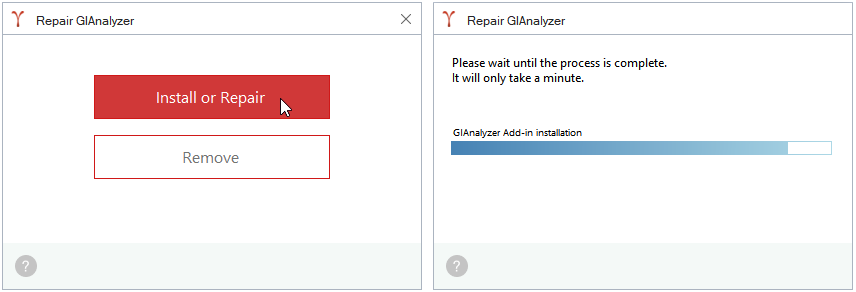
The Repair Tool fixes most installation problems. Run it with Excel closed. It:
- installs the Visual C++ runtime and the Visual Studio Tools for Office runtime;
- clears what Windows and Excel remember about earlier versions and about add-ins Excel turned off, and installs the certificate that lets Windows trust GIAnalyzer;
- installs, repairs or uninstalls GIAnalyzer, then offers to open Excel.
To run it:
- Download the Repair Tool (
GIAnalyzer.Repair.exe) and open it from your browser's downloads. - Choose Install or Repair. If it asks to install Microsoft components, click Yes. Wait until it finishes.
- To remove GIAnalyzer from the computer instead, choose Remove.
Some antivirus programs block .exe files. If the Repair Tool is blocked,
ask your IT support to allow it.
There is no GIAnalyzer tab in Excel
Excel sometimes turns add-ins off. Turn GIAnalyzer back on as described in If the GIAnalyzer tab doesn't appear. If that doesn't help, run the Repair Tool.
GIAnalyzer runs only in the desktop version of Excel for Windows, not in Excel on the web or on phones and tablets.
An exception occurred during hash validation
An antivirus program, firewall or proxy changed or blocked the installation files while they downloaded.
- Ask your IT support to allow downloads from gammaimpact.co.il and gianalyzer.com, then install again.
- Or install the offline version, which doesn't download anything during installation.
Downloading file: GIAnalyzer.vsto did not succeed
The installer couldn't download the add-in, usually because an antivirus program, firewall or proxy blocked it. Do as for the hash validation message above.
Customized functionality in this application will not work because the certificate used to sign the deployment manifest or its location is not trusted
- Run the Repair Tool, which installs the certificate.
- If the message comes back, add our sites to Windows' trusted sites: open Control Panel > Network and Internet > Internet Options > Security > Trusted sites > Sites. Add
https://gianalyzer.comandhttps://gammaimpact.co.il, then click Close and OK. - Install GIAnalyzer again.
The customization cannot be installed because another version is currently installed
- Run the Repair Tool and choose Install or Repair. It removes the earlier version first.
- If the message comes back, uninstall GIAnalyzer (see Uninstalling GIAnalyzer). Then press Windows+R, type
rundll32 dfshim CleanOnlineAppCacheand press Enter. Install GIAnalyzer again.
Unable to install this application because an application with the same identity is already installed
- Run the Repair Tool and choose Install or Repair. It clears the installation cache that causes this message.
- If the message comes back, close Excel, open the folder
%LOCALAPPDATA%\Appsand delete the2.0folder in it. Install GIAnalyzer again. Other add-ins installed the same way (ClickOnce) may then need to be installed again too.
The following Microsoft Office solution cannot be installed due to a general installation error
Microsoft components that GIAnalyzer needs are missing.
- Run the Repair Tool, which installs them.
- If the message comes back, install them yourself, then install GIAnalyzer again:
The value of the property 'type' cannot be parsed
The Visual Studio Tools for Office runtime is missing or damaged. Run the Repair Tool, or install the Visual Studio Tools for Office runtime yourself. Then install GIAnalyzer again.
The manifest may not be valid or the file could not be opened
- Install any waiting Windows updates.
- Install .NET Framework 4.8 if it isn't installed.
- Install GIAnalyzer again.
Free trial
(3)
Is there a free trial?
Yes. You can try the full version of GIAnalyzer free for 30 days. Start here.
How do I start a free trial?
Enter your name and email address on the free trial page, and we will email you a trial key. Install GIAnalyzer and enter the key. Or email us, and we will send you the installation file and trial keys, for one user or several.
What happens when the free trial ends?
After 30 days, the functions stop calculating and the workbooks no longer open. To continue, you need a licence: email us for a quote, or to extend the trial.
Licensing
(5)
How is GIAnalyzer licensed?
By user, for terms of one, two or three years. Every licence includes all the functions and workbooks. The price is €1,900 per user per year, plus VAT where it applies, with discounts for 2 or more licences and for terms of two or three years: see the price table on the GIAnalyzer page. To buy, email us.
What does a licence include?
Bug fixes and new versions, for the length of the licence. Support is offered separately.
What happens when a licence expires?
The functions stop calculating and the workbooks no longer open. Nothing is charged automatically. To continue, renew the licence and enter the new key: see When your licence ends.
How will I get the licence key?
We email it to you once the licence is agreed. If you have problems or questions, please email us.
Are updates included?
Yes, new versions are included for the length of the licence. See Updating GIAnalyzer.
Functions
(28)
Every function, with its arguments, is described in the function reference.
Bonds
(4)
How can I check a bond function's result?
In the bond example workbooks, some sheets have a button that builds a table of the bond's future cash flows and their present values. The table shows the steps that lead to the function's result, so you can check it. See Workbooks.
How are the cash flows of a floating rate bond projected?
From forward rates. The floating rate bond functions take two interest rate curves: one for discounting the cash flows, and one for calculating the forward rates that set the future coupons.
Are amortising bonds covered?
Yes. Fixed coupon bonds can repay principal in even payments, in level
payments, in amounts you specify, or on a custom schedule. Floating rate bonds
can repay in even payments, in amounts you specify, or on a custom schedule.
Each case has its own functions, for example
GIA_Bonds_FixedAmortEven_ValueFromCurve. See
Bonds in the function reference.
What can the bond functions calculate besides value and risk?
Depending on the type of bond: yield to maturity, accrued interest, Z-spread, carry and roll-down, and, for floating rate bonds, the last reset date.
FX Derivatives
(4)
Can I use market data from my own data vendor?
Yes. The functions take market data as cell values: spot rates, interest rates and curves, forward points, and volatilities or volatility surfaces. The data can come from any source you load into Excel.
Can I see an option's value and Greeks as graphs?
Yes. The FX option example workbooks have Graph Settings and Graphs sections, which plot the option's value and Greeks against the spot rate and the time to expiry.
What can the FX forward functions calculate besides the value?
The value of each leg, the forward price, forward points from interest rates or curves, cross forward points, rolling points, and the base or counter interest rate implied by a forward price or forward points. See FX Derivatives in the function reference.
Can I calculate historical simulation VaR for an FX portfolio?
Yes. The Value at Risk functions calculate historical, hybrid historical and Monte Carlo VaR for FX portfolios, from the historical data of the risk factors that you supply. The method is described in Value at Risk.
Interest Rate Derivatives
(4)
Are interest rate options covered?
Yes: swaptions, including amortising swaptions and swaptions on overnight index swaps, and caps and floors. See Interest Rate Derivatives in the function reference.
What are the Manual Calculations workbooks for?
They work a valuation out step by step in the worksheet and compare the result with the function's. They show what the function does, and let you check it. They are in the Interest Rate Derivatives and Inflation Derivatives menus. See Workbooks.
How many interest rate curves does a cross-currency swap valuation use?
Each leg has a curve for discounting its cash flows, and each floating leg also has a curve for calculating forward rates. So a swap with two fixed legs uses two curves, a swap with one fixed and one floating leg uses three, and a swap with two floating legs uses four.
Should I work in automatic or manual calculation mode?
Either works. In automatic mode, Excel recalculates every function each time a cell changes, which can be slow in a workbook with many swaps. In manual mode you choose when to calculate, and the calculation tools, such as Calculate Selection, are available. See Calculation tools.
Inflation Derivatives
(4)
Which inflation derivatives are covered?
Zero coupon inflation swaps and real rate swaps. In a real rate swap, the nominal leg can pay a fixed or a floating rate, and the principal can be amortising. See Inflation Derivatives in the function reference.
Is seasonality taken into account?
Yes. The value and risk functions for inflation swaps take a seasonality argument: 12 numbers, one for each month.
What is seasonality, and where is it used?
Seasonality is how much the inflation rate in each month differs from the average monthly inflation rate over the year. It is used when expected inflation is interpolated between two points of the curve. For example, if expected inflation is 1% for one year and 2% for two years, the interpolated value for a year and a half is 1.5% without seasonality. With seasonality, it depends on the seasonality of the six months between the first year and the date.
Can the inflation leg and the nominal leg of a real rate swap be in different currencies?
Yes. The nominal leg can be in a different currency from the inflation leg.
Equity Derivatives
(4)
Are both European and American options covered?
Yes. European vanilla options are valued with the Black-Scholes model, and American vanilla options with a binomial model. See Equity Derivatives in the function reference.
Can I run stress scenarios on an equity option portfolio?
Yes. Value the options with the functions using shifted spot prices and volatilities, and compare the results with the base values to get the profit or loss in each scenario.
Can I see an option's value and Greeks as graphs?
Yes. The equity option example workbooks have Graph Settings and Graphs sections, which plot the option's value and Greeks against the spot price and the time to expiry.
Does the executive stock option function support features such as a maximum stock price?
Yes. Besides the usual option terms, the Executive Stock Option (ESO) functions take an exercise ratio (the ratio of the stock price to the strike at which employees exercise early), an annual change in the strike price, and a maximum stock price.
Risk and Performance Measures
(4)
Are the measures calculated from daily price changes?
You choose. An argument sets the interval of the changes: a number of days, a week, a month, a quarter or a year. For weekly changes, you also choose the day the week ends.
If the changes aren't daily, do they overlap?
You choose that too: an argument sets whether the changes overlap.
Can I leave a period out of the calculation?
Yes. Give the first and last dates of the period to exclude.
Are relative measures covered?
Yes. Averages, frequencies, percentiles and volatility each have a version for
two assets, whose name ends in 2, such as GIA_RPM_AverageChanges2. It
uses the differences between the price changes of the two assets. Beta,
correlation, tracking error, and the Jensen's alpha, Treynor and Modigliani
measures compare an asset with a benchmark. See
Risk and Performance Measures in
the function reference.
Interest Rates
(4)
What do the interest rate functions do?
They convert interest rates between compounding bases and day count conventions, calculate discount factors and forward rates from rates or curves, interpolate on curves, and calculate expected CPI. See Interest Rates in the function reference.
Which compounding bases are covered?
Annual, semi-annual, quarterly, monthly, simple and continuous. Not every function takes all of them: each function's page in the function reference lists the ones it accepts.
Which interpolation methods are covered?
Linear, log-linear, exponential and cubic spline.
Which day count conventions are covered?
Act/act, act/360, act/365, 30/360, 30E/360, 30US/360, 30I/360, 30G/360 and NL-365. Some functions accept a shorter list, shown on the function's page.